Running a business involves making important decisions every day, from deciding which products to restock to determining whether sales are improving or declining. However, making the right decisions can become difficult when you do not understand your business numbers. Many business owners avoid reading sales reports because they look complicated, contain too many figures or require mathematical knowledge. The good news is that you do not need to be an accountant or a mathematics expert to understand your business performance. With the right POS (Point Of Sale) system, reading a sales report becomes easier because important business information is organized into simple figures, summaries and comparisons. Modern POS software helps business owners track daily sales, identify best-selling products, monitor payment methods and understand customer purchasing patterns without manually calculating every transaction. Whether you operate a supermarket, minimart, pharmacy, restaurant, hardware shop, wholesale business or retail outlet in Kenya, understanding how to read a sales report can help you make smarter business decisions. A reliable POS SYSTEM collects sales information and converts it into useful reports that show what is happening in your business. Instead of guessing whether your business is making progress, you can use your Point Of Sale system to understand how much you sell, which products perform well and when customers buy the most. Even if you hate numbers, learning a few basic sales report terms can make a significant difference in how you manage your business. This guide by Digee Technologies Limited Company explains how to read a sales report in simple language and use the information to improve business performance.
What Is a Sales Report?
A sales report is a document or digital summary that shows how much a business has sold within a particular period. It provides information about sales transactions, products sold, revenue generated, payment methods and other important activities. Businesses can generate sales reports daily, weekly, monthly, quarterly or annually, depending on their needs.
For example, a minimart owner may want to know how much the shop sold yesterday, while a supermarket manager may need a monthly report to compare performance across different branches. A restaurant owner may want to identify the most popular meals, while a pharmacy owner may want to know which products generate the highest sales.
A modern POS SYSTEM makes it easier to access this information because sales transactions are recorded automatically when customers make purchases. Instead of manually checking receipts and calculating totals, business owners can use POS software to generate reports within a few clicks.
A good Point Of Sale solution can organize sales information into different categories, helping business owners understand their operations without spending hours working with spreadsheets. The purpose of a point of sale system is not simply to record transactions but also to provide information that supports better business decisions.
Why Should You Read Your Sales Report?
Many business owners concentrate on selling products and serving customers but rarely take time to review their sales performance. This can make it difficult to identify problems before they affect business profitability.
Reading your sales report regularly helps you understand whether your business is performing as expected. It also allows you to identify opportunities for improvement.
Here are some important reasons to read your sales report.
1. Understand How Much Money Your Business Makes from Sales
Your sales report shows the total value of products or services sold within a particular period. This helps you understand the amount of business activity taking place.
For example, if your shop generates KSh 25,000 in sales on Monday and KSh 40,000 on Tuesday, you can immediately see that Tuesday recorded higher sales.
Your POS software can display these figures automatically, allowing you to compare different days without manually adding individual transactions.
However, remember that total sales are not the same as profit. You must also consider product costs, expenses, discounts, refunds and other business costs before determining how much money your business has earned.
2. Identify Your Best-Selling Products
Not every product in your shop performs equally. Some products sell quickly, while others remain on shelves for weeks or months.
A sales report generated through your POS SYSTEM can help you identify products that customers purchase most frequently.
For example, a minimart may discover that bread, milk, cooking oil and sugar generate consistent sales. A hardware shop may find that cement, nails and electrical fittings are among its most popular products.
Understanding product performance helps you make better purchasing decisions. You can prioritize products that customers buy regularly while reviewing slow-moving items to avoid unnecessary stock purchases.
3. Know When Your Business Makes More Sales
Sales performance can change depending on the day, week, season or time of day.
A restaurant may experience higher sales during lunch and dinner, while a retail shop may receive more customers during weekends.
Your Point Of Sale system can help you identify these patterns through daily and hourly sales reports.
This information allows you to organize employee schedules, prepare enough stock and improve customer service during busy periods.
4. Monitor Business Growth
Comparing sales reports from different periods helps you understand whether your business is growing, remaining stable or experiencing declining sales.
For example, if your business generated KSh 300,000 in sales last month and KSh 360,000 this month, your sales increased.
Your POS software makes these comparisons easier by organizing historical sales information into reports that management can review.
5. Identify Business Problems Early
A sudden decline in sales may indicate several problems, including stock shortages, poor customer service, pricing issues or increased competition.
Regularly reviewing reports from your POS SYSTEM helps you identify unusual changes and investigate them before they become bigger challenges.
Understanding the Most Important Numbers in a Sales Report
You do not need to understand every figure in a sales report. Start with the most important numbers and gradually learn how they relate to your business.
Here are the key figures every business owner should understand.
1. Total Sales
Total sales refer to the overall value of products or services sold within a selected period.
For example:
EXAMPLE: DAILY SALES REPORT
KSh 45,000
Total sales for the day
- Morning sales: KSh 12,000
- Afternoon sales: KSh 18,000
- Evening sales: KSh 15,000Total: KSh 45,000
This is one of the first figures to check when opening your POS SYSTEM sales report.
Ask yourself whether the amount is higher or lower than your usual daily sales. If the amount is lower, investigate possible reasons. If it is higher, identify what contributed to the improvement.
2. Number of Transactions
The number of transactions tells you how many completed sales your business processed during a particular period.
For example, if your shop records 100 transactions in one day, it means customers completed 100 purchases.
This figure helps you understand customer activity. A business can experience high total sales from a small number of large purchases or lower sales from many small purchases.
Your point of sale system can help you monitor transaction volumes and compare customer purchasing activity across different days.
3. Average Transaction Value
Average transaction value tells you how much customers spend per transaction on average.
The calculation is simple:
\[ \text{Average Transaction Value} = \frac{\text{Total Sales}}{\text{Number of Transactions}} \]
For example:
- Total sales: KSh 50,000
- Number of transactions: 100
- Average transaction value: KSh 500
This means each customer transaction generated an average of KSh 500 in sales.
If your average transaction value increases, customers may be purchasing more products or choosing higher-priced items.
A POS SYSTEM helps you monitor this figure without manually calculating every sale.
4. Cost of Goods Sold (COGS)
Cost of Goods Sold refers to the direct cost of the products a business sells during a particular period.
For example, if a supermarket sells products worth KSh 100,000 and the purchase cost of those products is KSh 65,000, the cost of goods sold is KSh 65,000.
This figure is important because it helps you understand how much of your sales revenue is used to cover product costs.
A reliable POS software solution may help businesses maintain product cost information and generate reports that support stock and financial analysis.
5. Gross Profit
Gross profit is the amount remaining after subtracting the cost of goods sold from sales revenue.
\[ \text{Gross Profit} = \text{Net Sales} – \text{COGS} \]
For example:
- Net sales: KSh 100,000
- Cost of goods sold: KSh 65,000
- Gross profit: KSh 35,000
This means the business generated KSh 35,000 in gross profit before deducting other expenses such as rent, salaries, electricity, transport and internet costs.
Understanding gross profit helps you determine whether your selling prices provide enough room to cover business expenses.
6. Discounts and Refunds
Sales reports may also include discounts and refunds.
Discounts show how much customers saved through promotional offers or reduced selling prices. Refunds show the value of sales returned or reversed according to the system’s transaction records.
For example, if your business gives KSh 5,000 in discounts during one week, you should understand why those discounts were issued.
A Point Of Sale solution can help management monitor discounts, cancellations and refunds, making it easier to identify unusual transaction patterns.
7. Sales by Payment Method
Businesses receive payments through different channels, including cash, M-Pesa, bank transfers and card payments.
A sales report can show how much money customers paid through each method.
For example:
| Payment Method | Sales |
|---|---|
| Cash | KSh 20,000 |
| M-Pesa | KSh 35,000 |
| Card | KSh 10,000 |
| Total | KSh 65,000 |
This information helps you compare recorded sales with actual payments received.
A point of sale system that supports multiple payment methods makes payment reconciliation easier and helps business owners identify discrepancies.
How to Read a Sales Report Step by Step
If sales reports look confusing, do not try to understand everything at once. Follow these simple steps whenever you open your POS software.
Step 1: Select the Correct Date Range
Start by selecting the period you want to review.
You can choose:
- Daily sales reports.
- Weekly sales reports.
- Monthly sales reports.
- Quarterly sales reports.
- Annual sales reports.
For example, if you want to understand how your business performed in October, select the entire month instead of viewing only one day.
Make sure you compare similar periods. Comparing a full month with a few days can produce misleading conclusions.
Step 2: Look at Total Sales First
Find the total sales figure at the top of your POS SYSTEM report.
This gives you a quick overview of the amount of sales generated during the selected period.
Ask yourself whether the amount meets your expectations and whether it is higher or lower than the previous period.
Step 3: Check the Number of Transactions
Next, check how many sales transactions were completed.
This helps you understand whether changes in total sales resulted from more customers purchasing or customers spending more per transaction.
For example, your sales may increase because more customers visited your shop, even if the average amount spent by each customer remained unchanged.
Step 4: Identify Your Best-Selling Products
Open the product sales section of your Point Of Sale system report.
Look for products with the highest quantities sold and the highest sales values.
These two measurements are different. A product may sell in large quantities but generate relatively little revenue because its selling price is low.
Understanding both figures helps you make better stock and pricing decisions.
Step 5: Review Payment Methods
Check how customers paid for their purchases.
Compare cash, M-Pesa, card and other payment records with the actual amounts received.
This step is particularly important for businesses handling many daily transactions.
Step 6: Compare Sales with Previous Periods
Compare the current report with the previous day, week or month.
Look for changes in total sales, transaction numbers and product performance.
Your POS software may provide comparison reports or visual charts that make these changes easier to understand.
Step 7: Decide What Needs Attention
A sales report becomes useful when you take action based on the information.
For example:
- If milk is selling quickly, consider increasing reorder quantities.
- If sales are declining, investigate customer demand and pricing.
- If discounts are unusually high, review discount approvals.
- If one payment method has discrepancies, investigate the reconciliation records.
- If a product is not selling, consider reducing future purchases.
The goal is to use your POS SYSTEM reports to improve business decisions rather than simply looking at numbers.
How to Understand Sales Trends Without Complicated Mathematics
A sales trend shows how business performance changes over time. You do not need advanced mathematical skills to identify these patterns.
For example, imagine your business records the following weekly sales:
| Week | Total Sales |
|---|---|
| Week 1 | KSh 80,000 |
| Week 2 | KSh 90,000 |
| Week 3 | KSh 85,000 |
| Week 4 | KSh 110,000 |
Example of Weekly Sales Performance
Illustrative figures in Kenyan shillings.
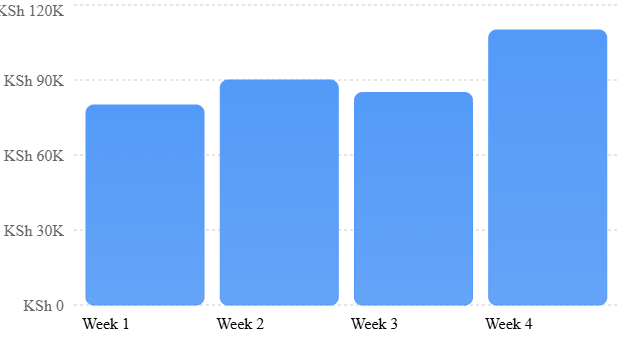
Looking at these figures, you can immediately notice that Week 4 recorded the highest sales, while Week 1 recorded the lowest.
You can then investigate what happened during Week 4. Perhaps your business introduced a promotion, received new stock, attracted more customers or experienced increased seasonal demand.
Similarly, if sales decline for several weeks, you should investigate the possible causes.
A good Point Of Sale system makes it easier to identify these patterns because it stores sales records that can be compared over time.
Understanding Sales Reports Through Simple Business Examples
Different businesses use sales reports in different ways. Understanding practical examples can help you see how the information applies to your daily operations.
Example 1: Minimart or Supermarket
A minimart owner opens the daily POS SYSTEM report and discovers that total sales were KSh 60,000.
The product report shows that bread, milk and cooking oil were among the best-selling items.
The owner also discovers that milk sales increased significantly during the week.
What should the owner do?
The owner can increase milk reorder quantities, monitor expiry dates and ensure that the product remains available.
The sales report has helped the business make a practical inventory decision.
Example 2: Restaurant
A restaurant owner uses POS software to review weekly sales.
The report shows that chicken meals and fresh juice generate more sales than other menu items.
The owner can use this information to review food purchasing, ingredient availability and menu planning.
If certain meals sell poorly, the restaurant can investigate their pricing, quality or customer demand.
Example 3: Pharmacy
A pharmacy owner reviews the monthly product sales report and identifies products with high sales volumes.
The report also shows products that have remained in stock for a long period.
The owner can use this information to plan purchasing, reduce unnecessary stock accumulation and monitor expiry dates.
A suitable point of sale system can make product movement easier to monitor.
Example 4: Hardware Shop
A hardware shop uses its POS SYSTEM to identify the products generating the highest sales revenue.
The owner discovers that cement and steel products contribute significantly to monthly sales.
However, some smaller accessories sell in higher quantities.
This information helps the owner understand product demand and plan stock purchases more effectively.
Sales Revenue vs Profit: Do Not Confuse the Two
One of the biggest mistakes business owners make is assuming that high sales automatically mean high profits.
Sales revenue refers to the money generated from selling products or services. Profit is what remains after the relevant business costs have been deducted.
Consider this example:
| Description | Amount |
|---|---|
| Total sales | KSh 200,000 |
| Cost of goods sold | KSh 130,000 |
| Gross profit | KSh 70,000 |
| Rent and other expenses | KSh 35,000 |
| Profit before tax and other adjustments | KSh 35,000 |
The business generated KSh 200,000 in sales, but its remaining amount after the listed costs was KSh 35,000.
This is why business owners should not rely on total sales alone when evaluating performance.
A POS SYSTEM can help track sales and product costs, depending on its configuration. However, accurate profit calculations also require complete expense records and appropriate accounting information.
Using POS software alongside proper financial management practices gives business owners a clearer understanding of their business performance.
Common Sales Report Mistakes to Avoid
Even when using a modern Point Of Sale system, business owners can misunderstand reports if they do not know what to look for.
Here are common mistakes to avoid.
1. Looking Only at Total Sales
High sales do not automatically mean high profits. Always consider product costs, expenses, discounts and refunds.
2. Ignoring Slow-Moving Products
Focusing only on best-selling products can cause you to overlook stock that is occupying storage space and tying up business money.
Review both fast-moving and slow-moving products through your POS software.
3. Comparing Different Time Periods
Comparing a full month with only two weeks can lead to incorrect conclusions. Always use similar reporting periods when analyzing business performance.
4. Ignoring Refunds and Cancelled Transactions
Refunds and cancellations can affect reported sales figures. Review them regularly to understand why transactions were reversed.
5. Failing to Reconcile Payments
Your sales report may show KSh 50,000 in M-Pesa transactions, but your payment records should be checked against the actual money received.
6. Not Taking Action
Reading a sales report without making decisions limits its value. Use the information to improve purchasing, pricing, stock management and customer service.
7. Entering Incorrect Product Information
If product prices, costs or categories are incorrect, your POS SYSTEM reports may not provide an accurate picture of business performance.
Maintain accurate product records to improve reporting reliability.
How Often Should You Read Your Sales Report?
The frequency depends on the size and nature of your business. However, reviewing reports regularly helps you identify problems early.
| Reporting Frequency | What to Check |
|---|---|
| Daily | Total sales, transactions and payment records |
| Weekly | Best-selling products and sales trends |
| Monthly | Revenue, product performance and business targets |
| Quarterly | Business growth and operational performance |
| Annually | Long-term sales patterns and planning |
For example, a busy supermarket may need to review sales reports daily, while a smaller business may focus on daily summaries and more detailed weekly reviews.
A modern POS SYSTEM makes it easier to access reports whenever they are needed.
How POS Software Makes Sales Reports Easier to Understand
Before digital systems became common, many business owners relied on handwritten records, calculators and spreadsheets to understand sales performance.
This process could take hours, especially when businesses handled hundreds of transactions every day.
Modern POS software simplifies this process by automatically recording transactions and organizing information into reports.
Here are some ways a Point Of Sale solution can help.
1. Automatic Sales Recording: Every completed transaction is recorded in the system, reducing the need for manual calculations.
2. Real-Time Sales Monitoring: Depending on the system, business owners can monitor sales as transactions happen.
3. Product Performance Reports: Businesses can identify best-selling and slow-moving products.
4. Payment Tracking: Sales can be organized according to payment methods such as cash, M-Pesa and card.
5. Employee Performance Reports: Management can review sales handled by different employees where supported.
6. Inventory Integration: Sales records can be connected to stock movement, helping businesses understand which products need replenishment.
7. Historical Comparisons: Business owners can compare sales across different days, weeks and months.
A reliable point of sale system transforms ordinary transaction records into useful business information. This allows even business owners who dislike mathematics to understand important performance indicators.
How Digee Technologies Limited Company Supports Better Business Management
Digee Technologies Limited Company understands that business owners need clear information to make informed decisions. Running a business should not require spending hours calculating sales totals or struggling to understand complicated spreadsheets.
A modern POS SYSTEM can help simplify daily business operations by bringing sales recording, inventory management and reporting together.
With suitable POS software, businesses can access important sales information, monitor product performance, review transaction records and understand customer purchasing patterns.
Whether you operate a minimart, supermarket, restaurant, pharmacy, hardware shop, wholesale business or retail outlet, having an organized Point Of Sale system can make managing daily activities easier.
Digee Technologies Limited Company focuses on providing digital business solutions that help organizations improve operational efficiency and manage their activities more effectively.
A reliable point of sale system gives business owners better visibility into what is happening within their businesses. Instead of relying entirely on guesswork, they can use actual sales records to make decisions about stock, pricing, employee performance and business growth.
For businesses looking to improve how they manage information, adopting modern POS software is an important step towards better organization and more informed management.
Frequently Asked Questions (FAQs)
1. What is the easiest way to read a sales report?
Start by checking total sales, the number of transactions, best-selling products and payment methods. These figures provide a simple overview of business performance. A reliable POS SYSTEM makes it easier to access this information.
2. Do I need accounting knowledge to understand a sales report?
No. You only need to understand a few basic terms, such as total sales, transactions, average transaction value, cost of goods sold and gross profit. Modern POS software can organize much of this information automatically.
3. What is the difference between sales and profit?
Sales represent the total value generated from selling products or services, while profit is what remains after deducting relevant business costs.
4. How can I identify my best-selling products?
Open the product performance report in your Point Of Sale system and review the products with the highest quantities sold and sales values.
5. Why are my sales high but my profit low?
This may happen because of high product costs, excessive discounts, operating expenses, pricing problems or wastage. Review your sales and financial reports to identify the cause.
6. How often should I check my POS sales report?
Daily reviews help monitor transactions and payments, while weekly and monthly reviews help identify trends and evaluate business performance.
7. Can POS software show which employees make the most sales?
Many POS software solutions provide employee sales reports, allowing authorized managers to review sales handled by individual employees.
8. Can a POS system track M-Pesa and cash sales separately?
Yes. A suitable point of sale system can record different payment methods, depending on its payment configuration and supported integrations.
9. What should I do if my sales suddenly decrease?
Review product availability, customer demand, pricing, promotions, employee performance and previous sales trends. Your POS SYSTEM reports can help you identify areas that need attention.
10. Why should small businesses use a POS system?
A POS SYSTEM helps small businesses record transactions, manage stock, monitor sales and generate reports. It reduces reliance on manual recordkeeping and supports better business decisions.
Conclusion
Reading a sales report does not have to be difficult, even if you dislike numbers. You do not need advanced mathematical skills to understand whether your business is performing well. Start by checking total sales, the number of transactions, average transaction value, best-selling products and payment methods. As you become more familiar with these figures, you will find it easier to identify sales trends, recognize business challenges and make better decisions. A reliable POS SYSTEM simplifies this process by automatically recording transactions and organizing information into understandable reports. With modern POS software, business owners can spend less time calculating figures and more time improving customer service, managing inventory and growing their businesses. Digee Technologies Limited Company encourages businesses to embrace digital solutions that make daily operations easier and more organized. Whether you run a small retail shop or a growing enterprise, a dependable Point Of Sale system can help you understand your numbers and manage your business with greater confidence. Remember, you do not have to love numbers to run a successful business. You simply need to understand what your numbers are telling you and use that information to make smarter decisions.